“My business is not showing on Google Maps” is one sentence that can describe several completely different problems. An electrician whose profile was suspended over a P.O. box address is dealing with something entirely different from an HVAC company that shows up fine when you search its name but never appears for “AC repair near me.” A landscaper whose customer across town can’t find them isn’t necessarily broken at all. That might just be how local search works.
The trouble is that all of these feel identical from the owner’s chair. You search your business, you don’t see what you expect, and you conclude the whole thing is broken. But “not showing” and “not ranking” are not the same problem, and they aren’t fixed the same way. Before you touch a single field in your profile, spend ten minutes working out which one you actually have. A fix for a suspended listing does nothing for a relevance problem, and the reverse is also true.
This article walks through how to tell the difference, using Google’s own Business Profile documentation rather than guesses about “the algorithm.”
What happens when you search? A quick diagnostic
Search for your business by name, then by service plus city. Use a device that isn’t signed in to your Business Profile account. A phone on cellular data works, since it won’t carry your saved locations.
| What you see | What it may indicate | What to check next |
|---|---|---|
| Can’t find the business by name at all | Profile may be unverified, suspended, unpublished, or never fully created | Verification status, suspension notices, whether the profile exists |
| Find it by name, but not by service (e.g., “ABC Roofing” works, “roof repair Phoenix” doesn’t) | Profile is visible, so this is likely a relevance/ranking issue rather than a visibility one | Categories, service descriptions, website content |
| You see it, but a customer elsewhere says they can’t | May be normal, since local results vary by searcher location | Ask them to search from their own location rather than trusting your results |
| A listing that used to appear is gone | Something changed: suspension, duplicate, eligibility issue, pending edit | Dashboard notifications, recent edits |
| A duplicate listing appears instead of, or alongside, yours | Two profiles may exist for the same business | Which one is verified, which holds your reviews |
| You’re a service-area business expecting a pin everywhere you work | Misunderstanding of how service-area businesses display | Whether your address is meant to show at all |
These are starting points, not diagnoses. Here’s each one in detail.
1. First, check whether your Business Profile actually exists
Search your exact business name plus city on Google and separately on Maps. If nothing appears at all, you may not have a profile yet, or it may have been removed rather than merely hidden.
If a listing does appear but looks unfamiliar (no reviews or photos you recognize), someone else may have created it. That could be a past employee, a directory, or an old vendor. That’s a claiming and ownership problem, not a from-scratch setup problem.
2. Check whether the profile is verified
Google states that unverified business information isn’t eligible to display on Google, regardless of how complete the dashboard looks. The verification method you’re offered (postcard, phone, email, video recording, or a live video call) is determined by Google based on your business type and location. Most postcard codes arrive within 14 days.
If you started verification and never finished, your profile is probably sitting unpublished rather than live. Look for a “Get verified” prompt in your dashboard first. Nothing else matters until that’s resolved.
If you’re a plumber setting this up from scratch, our Google Business Profile for Plumbers guide covers the setup and verification sequence in more detail.
3. Check for suspension, eligibility, or profile problems
A profile can go from visible to gone with no ranking explanation at all. Google’s guidance is direct: profiles that don’t follow its guidelines can be suspended or disabled and stop showing until reinstated.
A few triggers are documented rather than assumed:
- P.O. box addresses aren’t permitted. Google states that businesses with a P.O. box address will have their profile suspended.
- Your business name must match your real-world name. Google’s guidelines say the name should reflect what’s used on your storefront, website, and stationery. Adding descriptors or service keywords that aren’t part of your actual name goes against that guideline.
- One profile per business. Google’s guidelines say there should only be one profile per business. For service-area businesses, Google also warns that your account may be suspended if it finds multiple profiles for the same metropolitan area.
Owners often report that a suspension notice doesn’t spell out the specific violation, though Google doesn’t document that either way. Plan to compare your profile against the guidelines above yourself. To appeal, Google’s process asks you to fix the issue and submit supporting evidence, such as a business license or utility bill, through the Business Profile appeals tool.
4. Your business may be on Google Maps but simply not ranking for your service
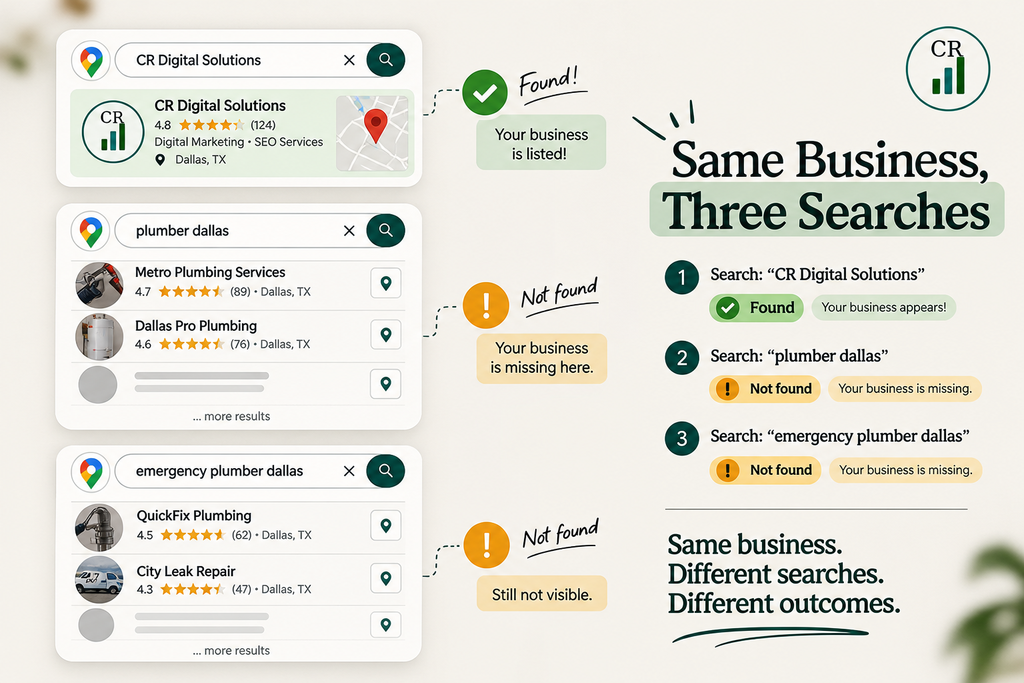
This section is the one owners most often skip, and it’s often where the real problem sits.
“Is my business listed?” and “Does my business appear when someone searches for what I do?” are different questions. A profile can be verified, in good standing, and fully visible by name, and still be nowhere to be found when someone searches “emergency plumber in Dallas” or “AC repair Phoenix.”
That’s not a visibility bug. It’s a relevance and ranking outcome, and it comes down to different things than verification or suspension. Google describes relevance as how well your profile matches what someone is searching for. If your category is generic (“Contractor” instead of “Electrician”), your services aren’t filled in, or your website never mentions what you’re being searched for, there’s less to match. Searching your own name will always look fine. It tells you nothing about how you perform for the searches that bring in customers.
5. Why you can see your business while a customer cannot
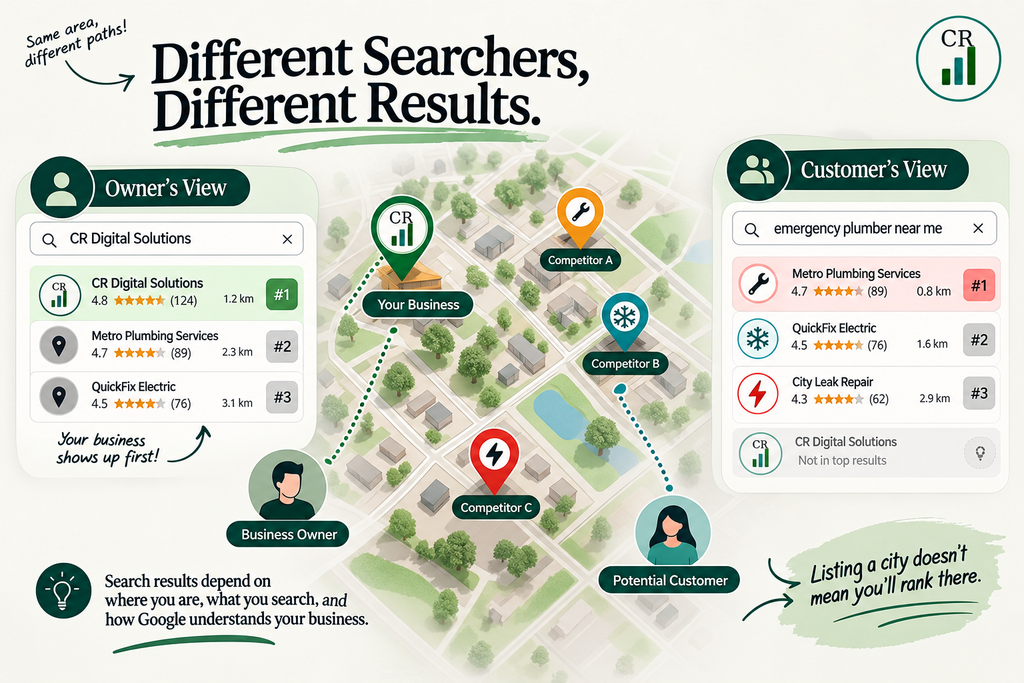
If your listing appears for relevant service searches but a customer elsewhere in your area can’t find you, that may not indicate a problem at all. Local results are calculated relative to the searcher’s location, so what you see from your own home or office isn’t necessarily what someone a few miles away sees.
This cuts both ways. Searching your own business from the same spot and concluding “we rank fine” is as unreliable as concluding “we’re invisible.” For an honest read, ask a customer or colleague in a different part of your service area to search and tell you what they see.
6. How relevance, distance, and prominence affect local results
Google states that local results are based mainly on relevance, distance, and prominence, and keeps the exact weighting private. The three factors aren’t a secret. How they combine is.
Relevance is how well your profile matches what was searched. Complete, accurate information gives Google more to work with.
Distance is how far your business is from the searcher, or from a location named in the search (like “roofer in Dallas”).
Prominence is how well-known the business is. Google says it draws on information from across the web, and that review count and review score factor into local ranking.
Google is explicit that these combine, so a farther business can outrank a closer one if it’s a better match on relevance or prominence. There’s no published percentage breakdown, and any article that gives you one is guessing. Distance is the one you can’t change. If your profile is verified and visible, ask which of the other two is weak for the searches you care about.
7. Service-area businesses: why your service area does not guarantee rankings
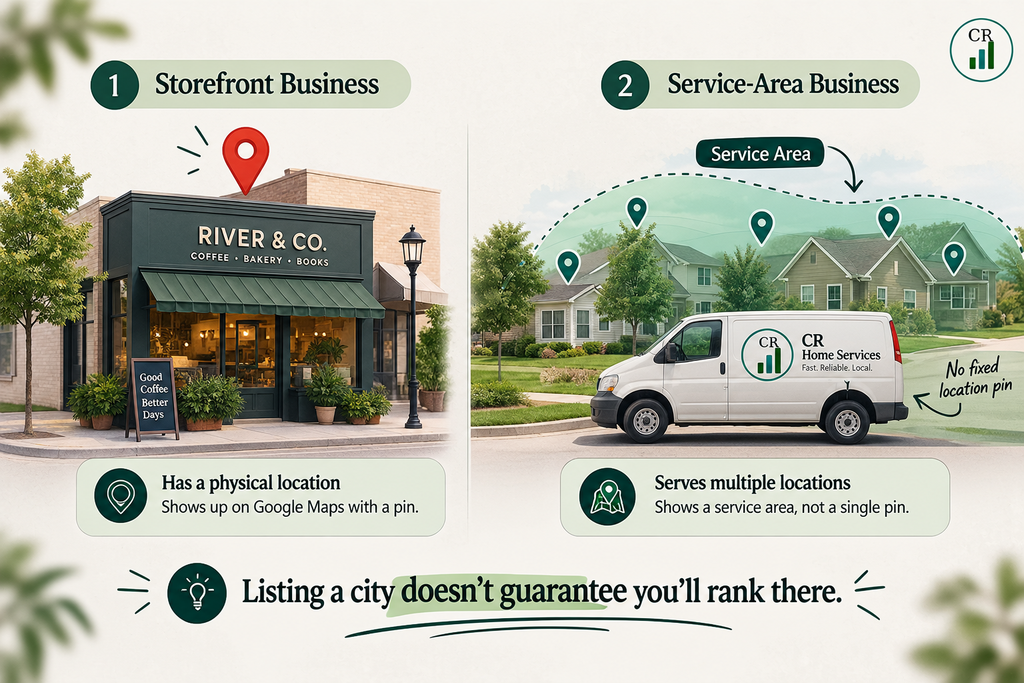
This matters a great deal for plumbers, HVAC companies, electricians, and roofers, since many operate as service-area businesses (SABs). They go to the customer rather than serving people at a storefront. Google’s documentation is specific: if you don’t serve customers at your business address, you’re required to hide it and show only your service areas.
Owners often misread this. Listing a city as a service area tells Google where you’re willing to work. It does not guarantee you’ll rank for searches in that city. Rankings there are still shaped by relevance, distance, and prominence for that specific search. An SAB whose address is hidden isn’t broken, and one that lists ten cities hasn’t earned visibility in all ten.
8. Check your business information for inconsistencies
Google’s guidelines ask that your business information reflect how the business is consistently represented in the real world: your name, address or service area, and phone number should match your signage, website, and other branding.
A basic check is enough here. Compare your Business Profile against your website’s footer and contact page. Confirm the name is your actual business name, the phone number is one that reaches you, and the address (or service area) is accurate. These details matter first for customers. If they see conflicting phone numbers or a wrong address, that hurts you regardless of how Google treats it. This isn’t a citation-building project, and Google’s ranking documentation doesn’t tie small formatting differences to lower rankings.
9. Check for duplicate or old listings
If a second listing exists, whether created by a past employee, an old vendor, or an import, it can complicate which profile shows and where reviews attach. The fix depends on how it happened. If you created the duplicate yourself, you can remove it from your account. If two profiles exist on Maps for the same business, you request a merge.
Check which listing is verified and which holds your review history before removing anything.
10. What to do if the business disappeared after previously appearing
Work through this in order rather than changing several things at once:
- Check your dashboard for a suspension or disabled notice.
- Check whether anyone with access recently edited the name, category, or address. Google reviews edits, and that review is usually quick but can occasionally take up to 30 days, so a profile that seems to have vanished may be pending review.
- Check whether a duplicate listing has appeared.
- Check whether your address, phone, or category recently changed anywhere else in a way that no longer matches your profile.
Identify the cause first. Then make one correction at a time.
11. How long does it take for a business to appear on Google Maps?
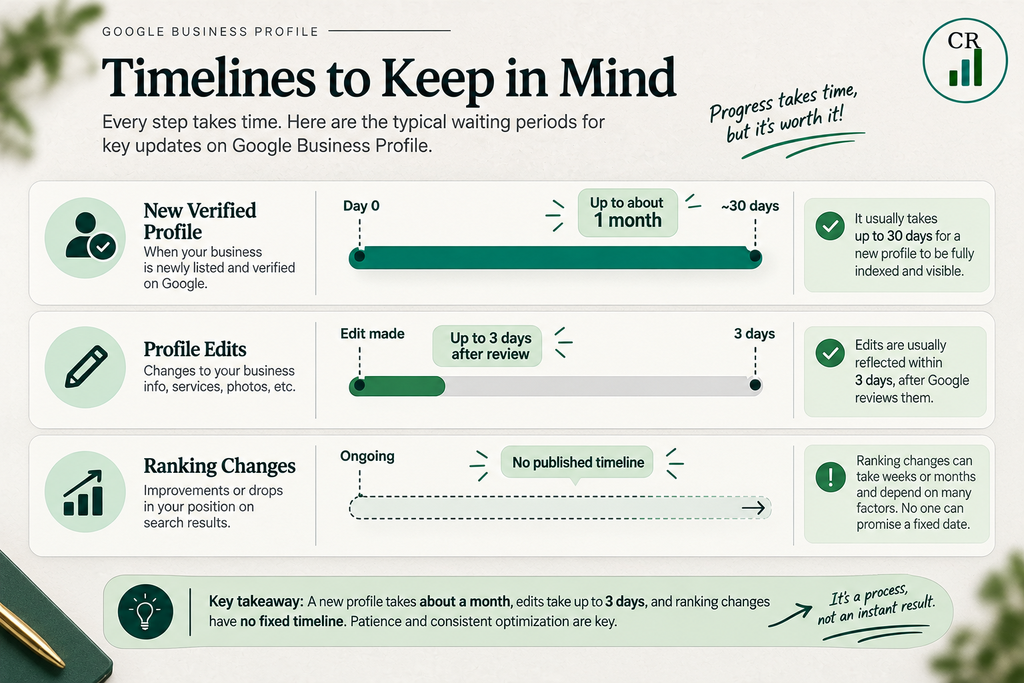
Google separates a few different timelines:
- A newly verified profile: Google states rankings for new businesses can take up to a month to establish even after verification.
- Edits to an existing profile: changes can take up to three days to appear in search results after the edit clears review, which is typically short but occasionally up to 30 days.
- Ranking changes from ongoing work (reviews, content, and so on): Google publishes no timeline, and it depends on competition and on how much your relevance and prominence actually change.
If it’s been under a month since verification, or a few days since an edit, some of what looks like “not showing” may be Google still processing the change.
12. What not to do
- Don’t create a second profile because the first seems broken. Google’s guidelines call for one profile per business, and a duplicate adds a new problem.
- Don’t add descriptors or services to your business name to try to force relevance. It goes against Google’s naming guidelines.
- Don’t assume more reviews fix everything. Reviews feed prominence. They don’t fix an unverified profile, a wrong category, or a suspension.
- Don’t change your name, address, category, and services all at once while diagnosing. You won’t know which change did what.
- Don’t rely on repeated searches from your own location as proof of how you rank. That shows how you rank for you.
Before you touch another field
Before trying to “rank higher on Google Maps,” find out whether the profile is missing, unavailable, or simply not ranking for the searches that matter. Those are different problems with different fixes, and treating one as the other wastes time.
If your profile is live but you’re still invisible for the searches your customers use, the problem is worth diagnosing before you change another field. That’s what our free SEO Audit is built around, if you’d like a second set of eyes on where yours is breaking down.
Frequently Asked Questions
Why is my business not showing on Google Maps?
Your Business Profile may be unverified, suspended, unpublished, affected by a duplicate listing, or simply not ranking for the search you’re performing. First check whether you can find the business by its exact name, then test relevant service searches.
See: Sections 1–4.
Why does my business show on Google Maps but not in search results?
Your profile can be visible when searched by business name but fail to appear for searches such as “roof repair Phoenix.” That usually means you’re dealing with a local ranking/relevance issue rather than a profile visibility problem. Google says local results are mainly influenced by relevance, distance, and prominence.
See: Sections 4–6.
Why can I see my business on Google Maps but my customer can’t?
Google local results vary according to the searcher’s location and other context. Your own search doesn’t necessarily represent what a customer several miles away will see.
See: Section 5.
How long does it take for a new business to appear on Google Maps?
Google says rankings for a newly verified business can take up to a month to establish. Edits to an existing profile can also take time to appear, depending on Google’s review process.
See: Section 11.
Do service-area businesses show on Google Maps?
Yes, but service-area businesses don’t necessarily display a public address. If you don’t serve customers at your business address, Google requires you to hide the address and specify your service areas. Listing a city as a service area does not guarantee that you’ll rank for searches in that city.
See: Section 7.
How do I know if my Google Business Profile is suspended?
Check your Business Profile dashboard for a suspension or disabled notice. If Google has suspended the profile, review the applicable Business Profile guidelines and follow Google’s reinstatement/appeal process.
See: Section 3.
Can I create another Google Business Profile if my current one isn’t showing?
Generally, no. Google says there should be one profile per business. Creating another profile can create a duplicate rather than solving the original problem.
See: Sections 9 and 12.