Short answer: Google Business Profile service area ranking can be confusing for service-area businesses. Adding a city to your Google Business Profile tells Google and customers where you provide your services, but it does not guarantee that your business will show up high in Google Maps when people in that city search.
Google says local results are mainly based on relevance, distance and prominence.
Service Area vs. Ranking: What’s the Difference?
| Question | Service area | Maps ranking |
|---|---|---|
| What is it? | The cities or postal codes you work in (up to 20) | Where your business shows up when someone searches |
| Who controls it? | You | Google’s local results system |
| Is it a guarantee? | No | No |
Good to know:
- You can’t set a service area as a circle (radius) around your business. You select cities, postal codes or other areas.
- Google says the overall service area generally shouldn’t extend more than about 2 hours of driving time from your business base.
Why Might I Not Show Up in a City I Serve?
Example: ABC Plumbing is based in Dallas. It lists Plano and Frisco. A customer in Frisco searches “plumber.”
For a service-area business on Google Maps, serving a city and ranking prominently in that city are two different things.
Google says local results are mainly based on three factors:
- Relevance: Does your profile match what the person is looking for?
- Distance: How far is each business from the person searching? Google does not share an exact formula.
- Prominence: How well known or established your business is. Google says information from across the web, including links and reviews, can add to prominence.
Two plumbers who both serve Frisco can show up differently, because their relevance, distance and prominence are not the same.
How to Check Where You Really Show Up
Don’t only search from your own office. Your results there are not what customers in other cities see.
- Pick your top 3 to 5 cities.
- Run the same service search for each city. Use a local rank-tracking or map-grid tool that can check results from different locations.
- Write down your position, who is above you, and how far they are.
- Check again every month.
| City | Search | Date | Your position | Who is above you | How far they are |
|---|---|---|---|---|---|
| Plano | plumber | Oct 2026 |
One search is only a snapshot. It is not your “final ranking.”
What You Can Do to Improve Your Chances
- Fill in your profile fully. Google says complete and detailed information helps it understand your business.
- Choose the category that best describes your main business.
- Ask happy customers for reviews, and reply to them.
- List only places you really serve. Don’t fill all 20 spots with cities you rarely visit.
- Add real photos and updates of your work.
- Build helpful city pages on your website. These service-area pages can give visitors useful information about your services in a specific city and support your organic visibility. They are not the same as the service area in your Google Business Profile, and they don’t guarantee a Google Maps ranking.
- Consider Local Services Ads if your type of business is allowed. They are paid placements, and they are separate from your organic Google Maps and local ranking.
Not showing in Maps at all? Read Why Is My Business Not Showing on Google Maps? Plumber? See Google Business Profile for Plumbers. Want expert help? See our Local SEO services.
Don’t Create Fake Locations
Don’t create virtual offices, fake addresses or extra Business Profiles just to appear in more cities. Google expects you to show your business as it really is.
A service-area business usually uses one Business Profile for the area it serves. A business with truly separate locations, each with its own staff and service area, may need separate profiles.
Which Type Are You?
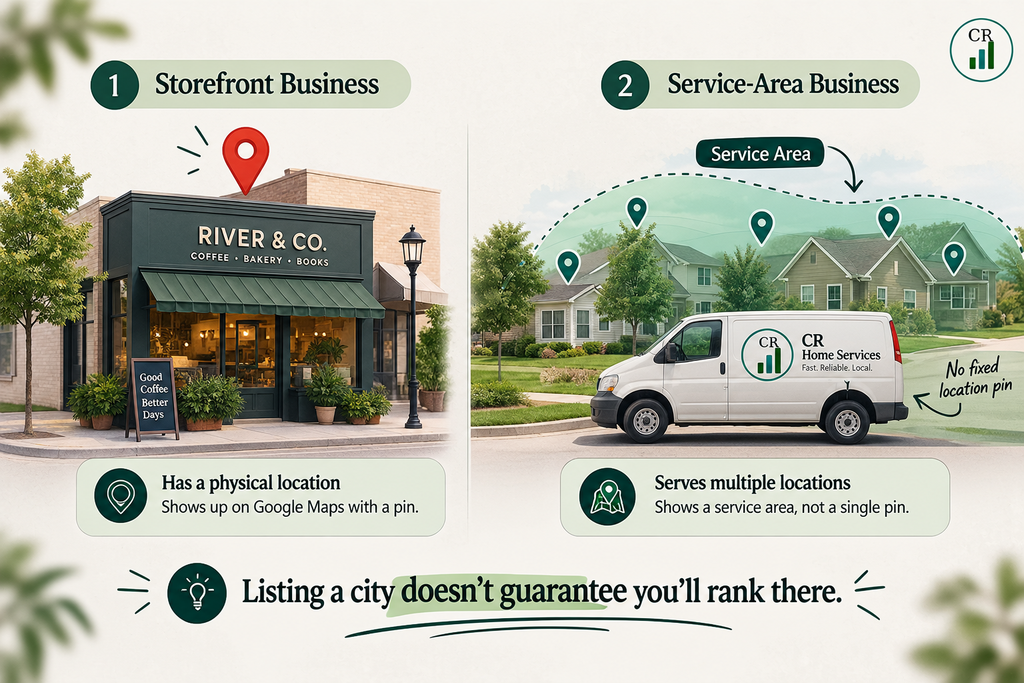
- Service-area business: You go to your customers. They don’t come to you. Hide your address and add service areas.
- Hybrid business: Customers visit you, and you also go to them. Show your address and add service areas.
- Storefront business: Customers visit your location. Show your address. If you also travel to customers, a service area may suit you too.
The Bottom Line
Where you serve, where your business is located, and where someone searches are three different things.
Keep these three things separate too:
- Service area: the geographic areas where you tell Google you provide services.
- Maps ranking: where your Business Profile appears in Google’s local results for a particular search.
- Website city page: location-specific content on your website.
None of these guarantees a particular Maps position.
Sources: Google: Manage your service areas · Google: Improve your local ranking · Google: Guidelines for representing your business
Does adding a service area help me rank in that city?
It tells Google and customers where you work. It does not guarantee a top spot. Ranking depends on relevance, distance and prominence.
Why do I rank in one city but not in another?
The distance to the customer changes, and each city has different competitors. Check each city on its own.
Can I show up outside my service area?
Google does not describe your service area as a ranking limit. Where you show up depends on relevance, distance and prominence.
How many service areas can I add?
You can add up to 20 cities, postal codes or other areas. Google says your overall service area generally shouldn’t be more than about 2 hours of driving time from your business base.
How long do service area changes take to show?
Google says approved changes can take up to 48 hours.
Should I hide my address?
Hide it if customers don’t visit you. Show it if customers visit your location.
Should I make a separate profile for each city?
Not just to rank there. A service-area business usually has one profile for the area it serves. Separate profiles are for truly separate locations that follow Google’s rules.
Why can’t I see my business address or pin on Google Maps?
If you operate as a service-area business and hide your address, Google won’t show that address to customers. Your service area can still be shown.
Do city pages on my website help?
They can give visitors useful details about your services in that city. They do not guarantee a Maps ranking.
How do I track rankings across many cities?
Use a map-grid rank tracker, or write down your results city by city. One number can hide big differences between neighborhoods.